01 / NOISE
Pop-ups that won't take no.
Hidden windows, delayed opens, tab floods, and “close” buttons that somehow open three more. The page gets louder the harder you try to leave.
Smart · Strict · MaxChrome + Edge · Popup and scam protection
Hushpop blocks the pop-ups, fake virus alerts and tech-support lock screens that scare people into calling a number. Quiet protection for the browser you already use.
01 / The problem
A fake Windows Defender screen. A McAfee alert in the corner. A voice telling you not to restart. These pages are built to scare people who aren't tech experts — and they work.
Hidden windows, delayed opens, tab floods, and “close” buttons that somehow open three more. The page gets louder the harder you try to leave.
Smart · Strict · MaxFull-screen warnings, keyboard traps, endless dialogs, and a toll-free number that goes to a criminal. Microsoft and McAfee do not work this way.
Safe page built inFake virus notifications in the corner of the desktop usually come from a website permission nobody remembers granting. Hushpop turns that tap off.
Notification blockingThe goal isn't more security software. It's fewer moments of panic.
See how Hushpop handles it02 / What it does
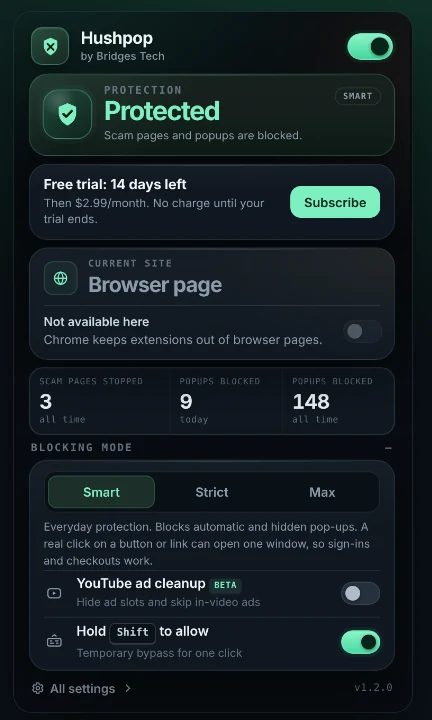
Hushpop sits in the toolbar and stays out of the way. Four kinds of quiet, one calm popup, and a support number for the moments software can't fix.
Hushpop recognizes fake virus alerts and support screens, mutes the tab, leaves fullscreen, and replaces the page with a plain-language “You're safe.”
Always free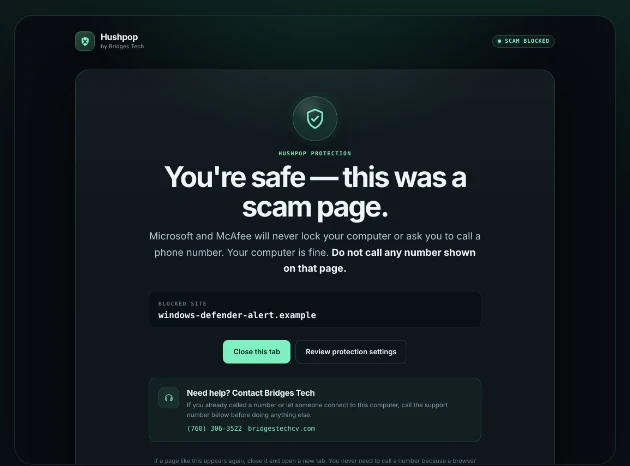
Automatic, delayed and hidden windows are stopped before they get a foothold. Smart keeps real sign-in clicks working.
Most fake virus alerts are just website notifications. One Hushpop toggle turns them off at the browser level.
Start with Smart. Turn it up when a site won't behave. Hold Shift when a real window needs through.
03 / The safe page
When Hushpop recognizes a scam page, it doesn't just close a tab. It gets the person back to a calm, readable page that tells them the truth.
04 / Your call
Smart for everyday browsing. Strict when pop-ups keep finding a way. Max for the sites that fight back. Shift lets one window through.
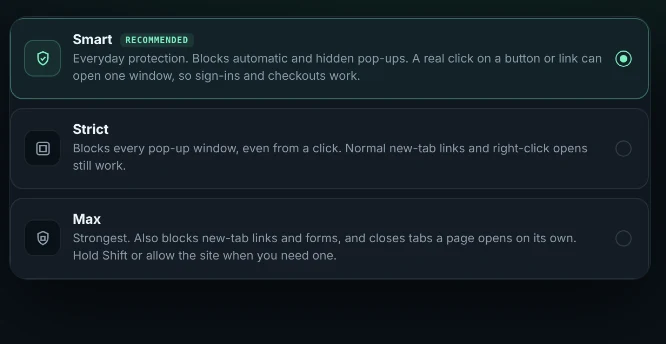
Everyday protection. Blocks automatic and hidden pop-ups. A real click on a button or link can open one window, so sign-ins and checkouts work.
Blocks every pop-up window, even from a click. Normal new-tab links and right-click opens still work. A good fit for a browser that keeps getting hit.
Strongest. Also blocks new-tab links and forms, and closes tabs a page opens on its own. Hold Shift or allow the site when you need one through.
05 / Getting started
No account. No card to start. Install Hushpop, pin the shield, and go back to the thing you were actually doing.
Works in Chrome and Microsoft Edge. The 14-day trial starts automatically. No payment details needed.
Hushpop is in your toolbar. Smart mode is on by default, so normal sign-ins and checkouts keep working.
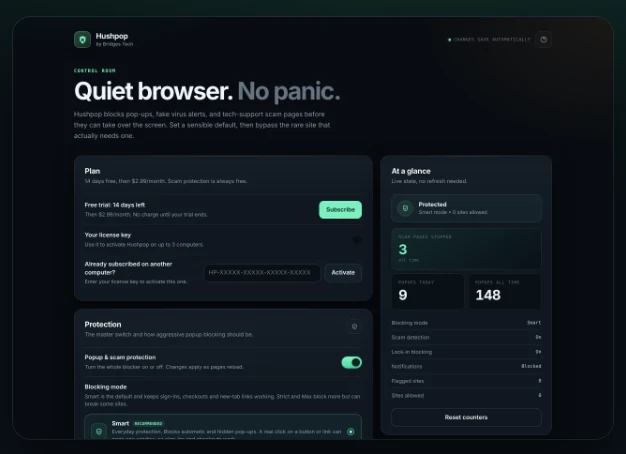
Keep the full popup blocker for $2.99/month, or stay on the free scam protection. Both are useful. Neither is a trap.
06 / Pricing
Try every feature free. When the trial ends, keep the full blocker for $2.99 a month. The scam protection that matters most stays free forever.
After your 14-day trial. No card to start. Cancel anytime from Settings → Plan.
Start your free trialBilling is handled securely by Stripe inside Hushpop.
07 / Private by design
Hushpop checks pages on your computer. It never sends your browsing history, page contents or web addresses to us. The only regular call is a license check so paid features know they're paid.
08 / Real help
Hushpop is made by Bridges Tech, a computer repair company in the Coachella Valley. If you're setting it up for a parent, a neighbor or a customer, call. We'll walk through it together.
Questions
Still unsure? Call Bridges Tech. A real person will tell you whether Hushpop is the right fit.
Talk to supportYes. Scam-page protection, lock-in blocking, the safe page and notification blocking stay free forever. Popup blocking, Strict and Max modes, and YouTube cleanup are included during the 14-day trial and then require the $2.99/month subscription.
No. The 14-day trial starts when you install Hushpop and needs no payment details. If you decide to keep the paid features, you'll subscribe inside Hushpop from Settings → Plan.
The paid features pause. Scam protection, notification blocking and the safe page keep working for free. You can subscribe at any time to turn popup blocking and the advanced modes back on.
$2.99 per month after the trial, billed through Stripe from inside the Hushpop extension. Prices are in USD and applicable taxes may apply. Hushpop never sees your card details.
Open Hushpop → Settings → Plan → Manage. Stripe handles cancellation. You keep access through the end of the paid period; the free scam protection stays after that.
Yes. Hushpop is a Chromium extension and works in Edge. If the Chrome Web Store won't install directly, enable “Allow extensions from other stores” in Edge, or call Bridges Tech and we'll help.
Smart mode is designed to let a real click open one window, so normal sign-ins and checkouts work. Strict and Max are more aggressive. Hold Shift or allow the site when you need an exception.
No. Page scoring happens on your computer. Hushpop does not send page contents, full URLs or browsing history anywhere. It talks to its license server only to check subscription status. Read the privacy policy.
One subscription covers up to three computers. You can activate a license key from Settings → Plan on another computer with the same subscription.
14 days free · No card required
Pop-ups, fake alerts and scam lock screens don't get to run the show. Install Hushpop and let the web be boring for a while.
Prefer a human? Call Bridges Tech at (760) 306-3522.